



About Monster Tile Party Game
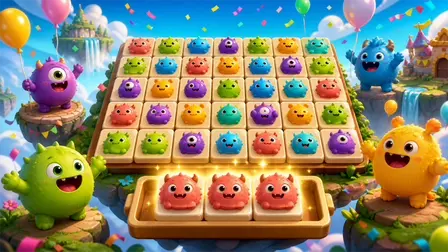
Join a colorful celebration of puzzles in Monster Tile Party Game! This bright, family-friendly triple-tile matching game is built around cheerful, original monster characters and highly satisfying match effects. Your goal is simple but highly engaging: pick uncovered tiles from a layered board and move them into your tray to match three identical monsters. Clear the entire board to win the level and progress across a growing world map. With daily rewards and helpful boosters, every quick session is designed to feel like a tiny, rewarding party!
Why We Recommend Playing Monster Tile Party Game
Finding a match-3 puzzle game that perfectly balances casual, stress-free gameplay with spatial logic can be difficult, but this game nails it. Here is why this title stands out in the tile-matching genre:
- Family-Friendly Aesthetic: The vibrant graphics, floating islands, and adorable monster designs make it highly appealing and safe for players of all ages.
- Brain-Teasing Layers: The layered tile board means you can’t just click anything; you must strategically uncover the tiles you need by clearing the top layers first.
- Rewarding Progression: A sprawling level map and daily rewards provide great incentives to keep returning for a quick puzzle session.
- Instant Browser Access: Jump straight into the tile-matching fun directly in your web browser with zero download setups required on PC or mobile.
How to Play Monster Tile Party Game
Clearing the board and keeping your tray empty requires careful planning and a sharp eye:
- Select Available Tiles: Look at the main puzzle board and click or tap any uncovered tile to instantly move it down into your collection tray.
- Match Three Monsters: The moment three identical monster tiles land in your tray, they will combine, pop, and vanish, freeing up valuable space.
- Watch Your Tray Space: Your tray has limited slots. If the tray fills up completely with unmatched tiles, you lose the level!
- Clear the Board: Successfully match and remove every single tile from the board to win the stage and unlock the next level on the map.
- Use Boosters Wisely: If you get stuck, use in-game boosters like Undo (reverses a move), Shuffle (rearranges the board), or Extra Slot (adds a temporary space in your tray).
💡 Pro Tips for Puzzle Masters
- Plan Before You Click: Always try to spot a pair or a full set of three on the board before you start moving tiles into your tray. Blindly clicking top-layer tiles is the fastest way to run out of space.
- Focus on Uncovering: Prioritize matching tiles that are covering other tiles. Unlocking the layers below gives you more options to work with.
- Save the Undo Booster: The “Undo” booster is incredibly powerful. Save it for late-game situations where you accidentally click the wrong monster and block your final tray slot.
Controls
PC Desktop Controls
- Select Tiles / Use UI: Click the Left-Mouse Button to move tiles into the tray, navigate the menu, or activate boosters.
Mobile Smartphone Controls
- Select Tiles / Use UI: Tap with a Single Finger on the touchscreen to select tiles and interact with the game.
👉 Discover more games: Check out our collection of Free Online Puzzle Games for more relaxing match-3 adventures and brain-training challenges!