











About Color the Room Game
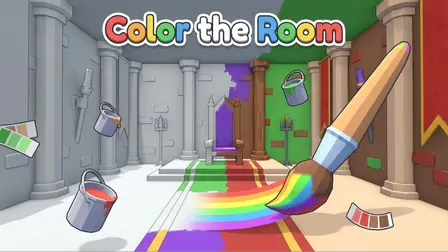
Unleash your creativity and relax in the Color the Room Game, a cozy 3D coloring experience that lets you bring dull, grayscale environments back to vibrant life. In this interactive coloring puzzle, you can choose from a variety of beautifully detailed fantasy dioramas, including a medieval castle, a witch’s hut, a futuristic space station, a serene underwater realm, a lush garden, and an urban graffiti loft. Using a versatile palette of brushes, fills, and textures, your goal is to paint every object in the room. As you complete rooms, you earn points to climb the global leaderboards. You can save your favorite custom looks in dedicated save slots, giving you the freedom to experiment with endless color combinations.
Why We Recommend Playing Color the Room
Finding a digital coloring game that moves beyond flat 2D pages into fully interactive 3D spaces is a uniquely relaxing experience. Here is why this cozy coloring game stands out:
- Full 3D Freedom: The ability to orbit the camera around the room allows you to view your artistic creations from every angle and find clever hidden objects to paint.
- Creative Expression: You are not locked into a “paint-by-numbers” system. You can choose your own colors, textures, and tools to make each fantasy room truly your own.
- Stress-Free Gameplay: There are no timers, enemies, or fail states. It is a pure, zen-like experience focused entirely on creativity and relaxation.
- Instant Browser Access: Jump straight into your 3D canvas directly in your web browser with zero download setups required on your PC or mobile device.
How to Play Color the Room
Painting your 3D masterpiece is simple and intuitive:
- Choose Your Canvas: Select which fantasy room you want to color from the main menu.
- Orbit the Camera: Drag your mouse or finger across the screen to rotate the camera around the 3D room, giving you access to walls, furniture, and hidden details.
- Select Your Tools: Choose your preferred color and tool from the palette, utilizing brushes for details, the fill tool for large areas, or the eraser to fix mistakes.
- Paint the Objects: Click or tap on the unpainted gray objects in the room to apply your selected color and textures.
- Save Your Masterpiece: Once the room is fully colored, you will score points. You can save your finished look in a dedicated slot, or watch a short rewarded ad to reset the room and try a completely new color scheme.
Pro Tips for 3D Artists
- Use Fill for the Foundation: Start by using the fill tool on the largest objects in the room (like the floor, walls, and big furniture pieces) to quickly establish your color palette before switching to the brush for smaller details.
- Check Every Angle: Because the room is fully 3D, some small objects might be hidden behind pillars or under tables. Always orbit the camera a full 360 degrees to ensure you haven’t missed a single unpainted spot.
- Experiment with Contrast: Do not just paint everything your favorite color. Use bright, contrasting colors on smaller objects to make them pop against darker walls and floors.
Controls
Desktop Controls
- Orbit Camera: Hold Left Mouse Button and Drag to rotate your view around the room.
- Paint Object: Left Mouse Click on an object to apply your selected color.
- Select Tools: Use your mouse to click on the color palette and tool icons.
Mobile Controls
- Orbit Camera: Touch and Drag with one finger to rotate the room.
- Paint Object: Tap directly on an object to paint it.
- Select Tools: Tap the on-screen palette and tool icons.
👉 Discover more games: Check out our collection of Free Online Relaxing Games for more cozy puzzles and creative activities!