


About Putt Party Game
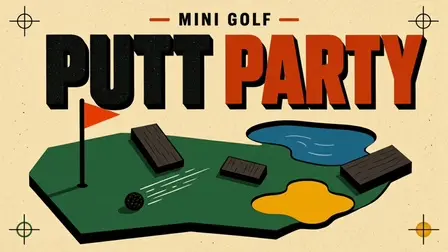
Step onto stylized greens in Putt Party Game, a laid-back mini golf puzzle adventure featuring a striking retro-poster aesthetic. Your objective is to line up precision shots, adjust power, and sink the ball into the cup using as few strokes as possible.
Every hole offers a unique spatial puzzle. The courses twist into tricky doglegs, funnels, and intersections while introducing interactive course mechanics like speed boosters, teleports, and trick ramps. Watch out for classic hazards like water hazards, sand traps, and angled bounce walls that can throw off your trajectory. Earn up to three stars per level, unlock new golf ball designs, and climb the global leaderboards as you perfect your putting technique!
Why We Recommend Playing Putt Party Game
Combining retro poster visuals with tactile drag-and-release shot mechanics makes for a delightful casual golfing experience. Here is why this mini golf puzzler stands out:
- Bold Retro Art Style: Vibrant retro-poster visuals and clean course geometry give every hole a distinct aesthetic charm.
- Dynamic Puzzle Golf Layouts: Navigate doglegs, cross intersections, funnels, speed boosters, and portal shortcuts.
- Helpful Shot Assist Tools: Utilize “Ball Back” to rewind a bad stroke or trigger “Aim Line” for an extended trajectory preview when lining up tight shots.
- Customization & Leaderboards: Earn 3-star ratings across levels to unlock custom golf ball styles and compete for high scores.
- Intuitive Multiplatform Controls: Smooth drag-and-release slingshot mechanics work seamlessly on both desktop mouse setups and mobile touchscreens.
How to Play Putt Party Game
Lowering your stroke count and earning 3-star ratings requires precise power control and smart bank-shot angles:
- Aim & Adjust Power: Click or tap on the golf ball, drag backward to line up your aim vector, and pull farther back to increase shot power.
- Release to Putt: Let go to strike the ball and watch it roll across the course.
- Navigate Course Obstacles: Bank shots off wooden walls, skirt past water hazards, and avoid getting stuck in sand traps.
- Use Interactive Features: Roll over speed boosters for extra distance and enter portals to warp across the green.
- Activate Assist Tools: Use the “Ball Back” tool to undo a bad shot or the “Aim Line” tool to extend your trajectory projection.
- Sink in Fewest Strokes: Drop the ball into the cup under par to claim maximum stars and unlock new content.
Pro Tips for Mini Golfers
- Bank Off Walls for Direct Paths: Direct lines to the hole are often blocked by sand or water; look for angled wall bounces to bypass hazards cleanly.
- Gauge Slingshot Distance Carefully: Pulling back all the way isn’t always best; soft, controlled putts prevent the ball from overshooting the hole on tight greens.
- Save Rewinds for 3-Star Attempts: Use your “Ball Back” tool when a ball lands in the water or sand to save your stroke count and maintain a 3-star run.
Controls
Desktop Controls (PC & Laptop)
- Aim & Power: Click and Drag backward from the golf ball.
- Shoot / Release: Release Left Mouse Button to putt.
- Use Assist Tools: Left-Click on-screen icons for Ball Back and Aim Line.
Mobile Controls (Smartphone & Tablet)
- Aim & Power: Touch and Drag backward from the golf ball.
- Shoot / Release: Lift Finger to hit the ball.
- Use Assist Tools: Tap on-screen buttons to activate Ball Back or Aim Line previews.