








About Run from 67 Game
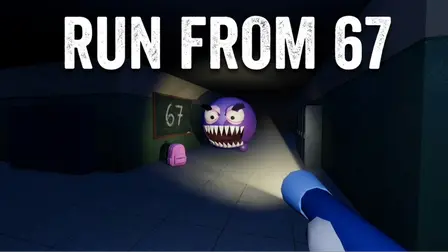
Immerse yourself in a tense, high-stakes game of hide-and-seek in Run from 67 Game, a first-person stealth horror escape experience set inside a pitch-black school. Trapped across seven distinct floors—ranging from night blue and emergency green to total blackout levels—your objective is to locate 6 hidden backpacks per floor to unlock the seventh exit door and escape.
Standing between you and survival is Sixseven, a dangerous entity that hunts strictly by sound. Every movement generates noise: sprinting carries up to 20 meters, walking carries 10 meters, crouching carries 4 meters, and standing completely still makes no sound at all. Your minimap displays your real-time sound radius alongside your flashlight cone. Manage a battery that drains in 60 seconds, throw noise-distracting coins to lure Sixseven away, use lockers for emergency hiding, and utilize stamina boosts like burgers and colas to stay alive!
Why We Recommend Playing Run from 67 Game
Finding a first-person horror game that prioritizes acoustic stealth mechanics and strategic resource management creates a thrilling escape loop. Here is why this stealth game stands out:
- Audio-Based AI Hunting: Sixseven tracks you entirely by ear, forcing you to monitor movement speed, landings, and surface noise.
- Real-Time Minimap Diagnostics: Visual indicators display your active noise radius, flashlight beam cone, and coin distraction zones in real time.
- Risk vs. Reward Flashlight Mechanics: Navigate dark corridors with a limited 1-minute battery, but avoid shining the light beam directly at Sixseven to prevent an immediate charge.
- Tactical Distractions & Hiding: Throw coins to redirect Sixseven’s search path or hide inside school lockers to let him pass by safely.
- 7 Unique Floor Environments: Experience changing atmospheres with distinct lighting themes, including sodium orange, ultraviolet, pool reflections, and fire alarm strobes.
- Stamina & Consumable Buffs: Manage your blue stamina bar, permanently increase capacity with burgers, or trigger 10 seconds of infinite sprint with colas.
How to Play Run from 67 Game
Surviving every floor and opening the seventh exit door requires silent movement and tactical noise manipulation:
- Search for Backpacks: Explore classrooms, corridors, and corners to locate all 6 scattered backpacks on the floor.
- Monitor Your Noise Radius: Keep an eye on your minimap circle:
- Sprinting: Audible from 20 meters away.
- Walking: Audible from 10 meters away.
- Crouching: Audible from 4 meters away.
- Standing Still: Completely silent (0 meters).
- Jumping: Silent mid-air, but landing generates a sudden noise spike.
- Manage Flashlight & Battery: Keep your beam away from Sixseven’s face; recharge your battery at wall panels before it drains out.
- Throw Distraction Coins: Throw a coin (
Q) into distant rooms to create a noise point on the minimap and lure Sixseven away. - Hide in Lockers: When Sixseven approaches, climb into a locker and wait quietly until he moves away.
- Unlock the Seventh Door: Once all 6 backpacks are collected, proceed to the unlocked seventh door to exit to the next floor.
Pro Tips for Stealth Survivors
- Crouch-Land After Jumps: Jumping itself is silent, but the landing thud makes noise. Hold the crouch key before hitting the floor to minimize landing sound.
- Recharge Flashlights Early: Do not wait until your battery hits zero. Hold
Eat wall charging panels whenever you are nearby to keep your light source topped off. - Use Coins for Aggressive Chokepoints: If Sixseven is patrolling a hallway containing a needed backpack, throw a coin into the opposite corridor and wait for him to investigate before making your move.
Controls
Desktop Controls (PC & Laptop)
- Move:
W,A,S,Dkeys - Look Around: Move Mouse
- Sprint:
Left Shift(drains stamina) - Crouch:
Ckey - Jump:
Spacebar - Interact / Lockers / Charge Panels:
Ekey (hold to charge battery) - Throw Coin:
Qkey - Toggle Flashlight:
Fkey - Pause Game:
Pkey
Mobile Controls (Smartphone & Tablet)
- Move & Sprint: Drag the Left Virtual Joystick (push fully forward to sprint automatically).
- Look Around: Drag across the Right Side of the Screen.
- Jump: Double-Tap the right side of the display.
- Crouch: Tap the Crouch Icon in the bottom left corner.
- Interact / Lockers / Doors: Tap the on-screen Hand Button.
- Toggle Flashlight: Tap the on-screen Battery Icon.