




About Mix & Paint 3D Game
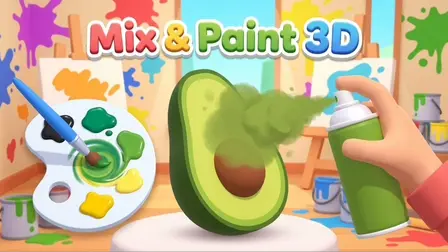
Unleash your inner artist with the Mix & Paint 3D Game! This relaxing and highly satisfying puzzle game combines hands-on color mixing with 3D painting. Your objective is to look at a target shade, choose the correct pigments, and blend them together on your digital palette to recreate the exact color. Once your paint is mixed, you get to spray or brush it onto a 3D object to see how closely your result matches the goal. To pass a level, you must achieve at least a 60% accuracy rating, but the real challenge is aiming for 90% or higher to earn a perfect result!
Why We Recommend Playing Mix & Paint 3D Game
Finding a game that balances creative freedom with a structured puzzle mechanic is a great way to unwind. Here is why this painting challenge stands out:
- Satisfying Tactile Gameplay: The action of dragging your brush around the palette to swirl and blend colors together is incredibly relaxing and visually pleasing.
- Color Theory Practice: It acts as a fun, practical test of your color theory knowledge. Figuring out exactly how much yellow to add to blue to get the perfect avocado green is a great brainteaser.
- Low-Stress Environment: There are no ticking clocks or aggressive enemies. You can take your time to mix, test, and clear your palette as many times as you need.
- Instant Browser Access: Jump straight into the art studio directly in your web browser with zero download setups required on your PC or mobile device.
How to Play Mix & Paint 3D Game
Matching the target shade and painting your objects requires a good eye for color:
- Load Your Brush: Look at the target color for the level. Click or tap a raw pigment from your available options to load it onto your brush.
- Mix on the Palette: Hold and drag your brush across the white palette to swirl and mix the colors together. Add different pigments until you find the perfect blend.
- Paint the Object: Once you are happy with your color, hold and drag across the 3D object to apply the paint or use the spray can.
- Check Your Accuracy: When you are finished painting, press the Done button to see your score. You need 60% accuracy to pass, and 90%+ for a perfect rating.
- Use Your Tools: If you make a mistake, use the Clear button to wash your palette. If you are stuck, use the Hint button to see which pigments you need to use.
Pro Tips for Master Painters
- Start Light, Go Dark: It is always easier to darken a light color than to lighten a dark one. Start with your lighter pigments (like white or yellow) and add darker pigments (like blue or black) a little bit at a time.
- Ensure Full Coverage: When you transition to the painting phase, make sure you rotate and cover the 3D object completely. Leaving large unpainted gaps can lower your final accuracy score, even if your mixed color was mathematically perfect.
Controls
Desktop & Mobile Controls
(This game requires only a mouse or touchscreen; no keyboard keys are needed.)
- Load Pigment: Click (PC) or Tap (Mobile) a pigment color to load your brush.
- Mix Colors: Click/Tap and Hold, then Drag across the palette to blend.
- Paint Object: Click/Tap and Hold, then Drag to move the brush or spray across the 3D model.
- UI Actions: Click or Tap the Clear, Hint, and Done buttons as needed.
👉 Discover more games: Check out our collection of Free Online Puzzle Games for more relaxing brainteasers and creative challenges!