








About Masterpiece Unharmed Restoration Game
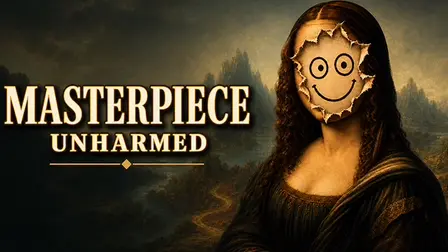
Step into a chaotic night at the museum in Masterpiece Unharmed Restoration Game! Following a wild night out, a collection of world-famous paintings has been absurdly ruined, and the strict museum inspector is already on his way. In this hilarious and fast-paced puzzle game, your job is to hide the traces of these ridiculous accidents and restore the art to its former glory. Read funny backstories, use your digital pipette to match colors perfectly, paint over the torn canvas gaps, and submit your forgery before the timer runs out to avoid the inspector’s caustic wrath!
Why We Recommend Playing Masterpiece Unharmed Restoration Game
Finding a casual puzzle game that perfectly blends digital painting mechanics with time-management panic and brilliant humor is incredibly rare. Here is why this title stands out in the puzzle genre:
- Hilarious Narrative Context: Every level begins with an absurd, funny story explaining how the priceless artwork was destroyed, adding immense charm to the gameplay.
- Satisfying Artistic Mechanics: Using the pipette to sample exact pixels and smoothly brushing over canvas tears feels highly tactile and rewarding.
- Humorous Grading System: After hitting “Check,” your frantic restoration is compared directly side-by-side with the original masterpiece, accompanied by the inspector’s savage and caustic verdicts on your mistakes.
- Instant Browser Access: Jump straight into saving the museum directly in your web browser with zero download setups required on PC or mobile.
How to Play Masterpiece Unharmed Restoration Game
Fooling the inspector and surviving your shift requires a keen eye for color and steady digital brushwork:
- Read the Briefing: Start by reading the funny accident plot to understand what happened to the painting.
- Sample the Colors: Select the pipette tool (or use the palette) to extract the exact color from the surviving areas of the painting.
- Paint the Damage: Adjust your brush thickness slider and carefully fill in the missing gaps on the canvas to match the original gradient.
- Fix Your Mistakes: If a stroke goes out of bounds or the color is wrong, use the eraser tool or cancel the stroke immediately.
- Beat the Clock: You are strictly timed. When the restoration looks acceptable, click the “Check” button before the timer hits zero to face the inspector’s judgment.
💡 Pro Tips for Perfect Restorations
- Zoom is Your Best Friend: Don’t try to paint tiny details from a distance. Use your mouse wheel to zoom in close and drag the canvas to get perfectly clean edges around the tears.
- Sample Frequently for Gradients: Classic paintings rarely use flat colors. To perfectly hide a gap in a shaded area, use the pipette tool constantly to sample the changing colors millisecond by millisecond.
- Manage Your Panic: As levels progress, time gets shorter. It is better to have a slightly mismatched color that fully covers the white canvas gap than to run out of time entirely!
Controls
PC Desktop Controls
- Paint / Erase: Click and hold the Left-Mouse Button (LMB) to apply color or erase mistakes.
- Sample Color: Click on the Pipette tool, then click anywhere on the canvas to copy that exact color.
- Change Brush Size: Click and drag the on-screen Brush Slider.
- Zoom Canvas: Scroll the Mouse Wheel (or use the side slider) to zoom in and out.
- Move Canvas: Click and Drag to pan around the painting while zoomed in.
- Submit: Click the “Check” button to finish the level.
Mobile Smartphone Controls
- Paint / Erase: Tap and drag your finger on the Touchscreen to paint over the gaps.
- Zoom & Pan: Pinch two fingers together or apart to zoom, and drag with two fingers to pan across the canvas.
- Tools: Tap the on-screen icons for the pipette, palette, eraser, and check button.
👉 Discover more games: Check out our collection of Free Online Puzzle Games for more creative drawing challenges and brainteasers!