






About Picture Shift Game
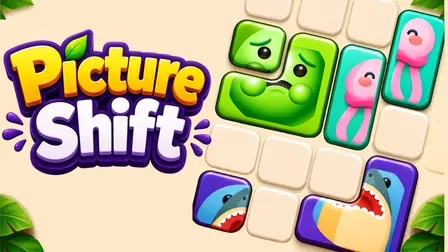
Rebuild shattered images from a chaotic pile of mismatched blocks in the Picture Shift Game. This highly engaging sliding puzzle tasks you with maneuvering uniquely shaped blocks—including L-bends, crosses, and zigzags—across a crowded grid to snap their hidden pictures back together. Whether the target is a cute cow, a rocket, or a slice of pizza, the pieces do not need to be in a specific spot on the board; they just need to be aligned correctly relative to one another. Featuring 100 handcrafted levels and an infinite Endless mode, the challenge constantly evolves as the timer ticks down and you face frozen blocks, locked chains, and live bombs.
Why We Recommend Playing Picture Shift Game
Finding a puzzle game that pushes your spatial reasoning while maintaining a thrilling pace is incredibly rewarding. Here is why this sliding block challenge stands out:
- Deep Strategy: The real puzzle is not figuring out what the picture is; it is determining the exact sequence of moves required to untangle the grid without boxing yourself in.
- Dynamic Hazards: The board fights back. Mechanics like ice that freezes blocks solid, chained pieces requiring keys, and ticking bombs keep the gameplay tense and exciting.
- Endless Replayability: After conquering the 100 beautifully handcrafted levels, an endless mode shuffles the deck and deals infinite puzzles to test your skills.
- Instant Browser Access: Jump straight into the brain-teasing chaos directly in your web browser with zero download setups required on your PC or mobile device.
How to Play Picture Shift Game
Untangling the board requires forward-thinking and careful spatial management:
- Slide the Blocks: Drag a block to slide it through empty space on the grid. Blocks only fit through gaps big enough to accommodate their specific shapes.
- Rebuild the Picture: Look at the target images sitting at the top of the screen. Slide the scattered pieces of that image into the correct formation to automatically snap them together.
- Clear Space: Completing a picture immediately clears its blocks from the board and thaws any adjacent ice, opening up crucial maneuvering room.
- Defuse Bombs: Bombs put a live countdown on your board. You must prioritize moving or clearing them before they hit zero!
- Use Boosters: If you are hopelessly stuck, spend your resources on boosters to freeze the timer for 10 seconds, smash a 1×1 chunk with a hammer, instantly merge a picture, or temporarily enable free movement through solid blocks.
Pro Tips for Puzzle Solvers
- Think Backwards: Before you make your very first move, look at the board and try to figure out which block needs to move last. Reverse-engineer your sliding sequence from there to avoid gridlock.
- Chase Pictures, Not Tidiness: Do not waste time trying to organize the board into neat rows. Focus entirely on completing any picture as fast as possible, as clearing those blocks is the only way to free up space.
- Shrink, Don’t Shove: If a single awkward corner is ruining your entire sequence, do not waste 30 seconds rearranging the whole board. Just use your Hammer booster to knock off a 1×1 chunk and slide right through.
Controls
Desktop Controls
- Slide Blocks: Left Mouse Click and Drag to slide the puzzle pieces through the empty grid space.
- Use Boosters: Click a booster icon, then Click your target block (valid blocks will glow) to apply it.
Mobile Controls
- Slide Blocks: Touch and Drag with your finger to maneuver the blocks.
- Use Boosters: Tap a booster icon, then Tap your target block on the board to use it.
👉 Discover more games: Check out our collection of Free Online Puzzle Games for more brainteasers and sliding block challenges!