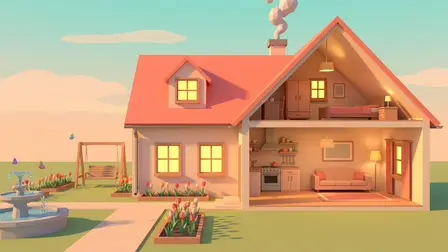











Design and furnish your ultimate house from scratch in Dream Home! This cozy 3D builder game invites you to raise walls, lay custom flooring, apply wallpaper, arrange furniture, and landscape yards featuring pools, fountains, and flower beds. Step inside your finished rooms using the first-person walk mode to explore day and night, or take on client orders to earn experience, level up, and unlock new building plots!
Why We Recommend Playing Dream Home
Finding a building game that balances creative sandbox freedom with goal-oriented progression can be rare. Here is why you should add this title to your routine:
- First-Person Exploration: Step right inside your finished creations to stroll through rooms, climb stairs, and view your house by day or night.
- Goal-Driven Client Briefs: Go beyond a regular sandbox by fulfilling daily client orders, getting graded, and leveling up your interior design career.
- Complete Customization Control: Paint walls, hang wallpaper, lay floors, arrange interior furniture, and landscape yards with pools or campfires.
- Instant Browser Access: Jump straight into architectural design directly in your web browser with zero download setups required on PC or mobile.
How to Play Dream Home
Constructing stunning houses and managing your design business requires structural planning and creative decorating:
- Build the Structure: Raise walls, lay down floors, and set up rooms across your open plot.
- Decorate & Furnish: Paint walls, apply custom wallpaper, and arrange furniture to match your aesthetic or client briefs.
- Landscape the Yard: Add finishing touches outdoors with flower beds, pathways, fences, pools, fountains, or a campfire.
- Explore in First-Person Mode: Switch to walk mode to experience your home from a human perspective, checking out the lighting by day and night.
- Fulfill Client Orders: Take on specific briefing tasks, get graded on your work, gain experience, and unlock new building plots.
Controls
PC Desktop Controls
- Building & Camera: Use the Mouse (right-click to rotate, wheel to zoom) to manage camera views and place objects.
- Move Camera: Press
WASDorArrow Keys. - Item Actions: Press
Rto rotate items,Deleteto sell objects, andEscto exit walk mode.
Mobile Smartphone Controls
- Building & Selection: Tap on the Touchscreen to build and select items.
- Camera & Walking: Use two fingers to rotate and zoom the camera, and use the on-screen joystick to walk around in walk mode.
## Key Features
- Cozy 3D House Builder: Design and furnish customized homes completely from scratch.
- Immersive Walk Mode: Explore your finished buildings from a first-person perspective by day and night.
- Client Career Progression: Complete daily challenge orders, earn experience, and level up to unlock multiple plots.
- Extensive Decor Options: Customize walls, floors, wallpaper, furniture, and outdoor yards with pools and fountains.
- Instant Free Browser Play: Build your dream architecture immediately on your computer monitor or mobile device with zero setup.