







About Color Sorting Game
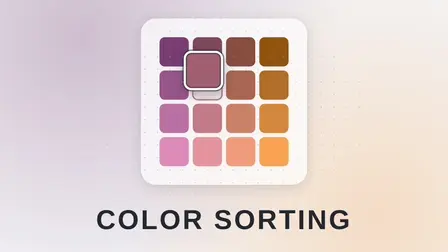
Experience a meditative logic puzzle crafted entirely of light and shade in the Color Sorting Game. Unlike standard water-pouring games, this experience centers on pure color theory: each board represents a single continuous gradient divided into uniform tiles and thoroughly shuffled. Pinned anchor tiles—especially at the corners—never move and establish the true boundaries of the gradient, ensuring every movable tile has exactly one correct position on the board. Because tiles are arranged purely by hue and luminosity, success comes from reading subtle shade shifts rather than guessing.
The game features palettes mathematically generated in the perceptually uniform OKLab color space, ensuring every step along the gradient feels visually proportional. Built with accessibility in mind, every board is designed to remain readable even with red and green hues removed, complemented by a dedicated color-blind palette toggle in the settings. Choose between Easy (5×4), Medium (7×5), and Hard (9×6) board sizes, utilize optimal swap hints when needed, track your personal best and average completion times, and aim to match or beat mathematically computed par swap targets with no countdown timer pressure.
Why We Recommend Playing Color Sorting Game
Finding an elegant puzzle that replaces stress and rapid reflexes with deep visual satisfaction makes for a calming mental workout. Here is why this gradient sorting puzzle stands out:
- True Color Harmony: Gradients are generated using OKLab color modeling, creating smooth, balanced transitions where every tonal step feels visually equal.
- Pure Logic Over Guesswork: Fixed corner pins define the spectrum’s axes, giving every single tile an exact, unambiguous place on the grid.
- Computed Par Targets: The par score is mathematically calculated as the theoretical minimum number of swaps to solve the board, giving you a tangible target to beat.
- Accessible Visual Design: The game checks that every board remains fully playable without red-green perception, alongside an optional color-blind palette mode.
- Zero Time Stress: Play entirely at your own pace without ticking clocks or countdown penalties.
- Instant Browser Access: Jump directly into the puzzle within your web browser with zero downloads required on desktop or mobile devices.
How to Play Color Sorting Game
Restoring the gradient requires keen observation and methodical tile exchanges:
- Study the Fixed Anchors: Look at the pinned tiles marked across the corners and edges; these immovable anchors dictate how colors must flow across rows and columns.
- Swap Movable Tiles: Click or tap a tile and select a second one to exchange their positions, or simply drag one tile directly over another.
- Follow Gradient Continuity: Shift tiles until the hues transition smoothly in all directions without harsh jumps or misplaced shades.
- Use Strategic Tools: Tap Undo to take back your last move, hit Reset to return to the original shuffle, or request a Hint to execute an optimal swap automatically.
- Beat Par: Strive to restore the complete gradient in as few moves as possible to match or surpass the board’s computed par score.
Pro Tips for Gradient Sorters
- Build Outward from Pinned Corners: Always place the tiles that sit directly adjacent to fixed corner pins first, as their extreme tonal values are easiest to identify.
- Solve by Row or Column Axis: Track how lightness changes vertically while hue shifts horizontally across the board to isolate where specific mid-tones belong.
- Step Back to Soften Focus: If two neighboring shades look indistinguishable up close, squint slightly or lean back; softening your focus makes color boundaries and misplaced tiles pop out immediately.
Controls
Desktop Controls
- Select & Swap: Left-Click one tile and then Left-Click a second tile to trade their positions.
- Drag & Swap: Click and Drag a tile directly over another tile to exchange them.
- Interface: Left-Click on Undo, Reset, Hint, or New Puzzle buttons.
Mobile Controls
- Select & Swap: Tap a tile to highlight it, then Tap an adjacent or distant tile to trade spots.
- Drag & Swap: Touch and Drag a tile onto another tile to swap them.
- Interface: Tap the on-screen menu buttons to undo moves or request hints.
👉 Discover more games: Check out our collection of Free Online Puzzle Games for more relaxing logic puzzles, matching challenges, and brain teasers!