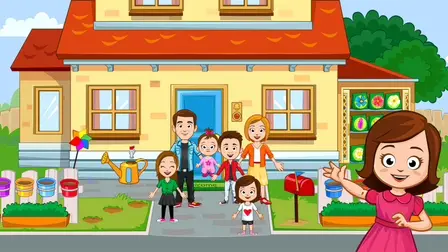









Welcome to My Town Home: Family Playhouse, a vibrant online dollhouse adventure that sparks your creative imagination. Step into a large, cozy two-story house designed for absolute player freedom. As the author of your own family story, you can choose a family, roleplay fun daily scenarios, and customize your home life exactly how you want. It is the ultimate virtual sandbox experience for players who love creative storytelling and interactive exploration!
How to Play My Town Home: Family Playhouse
This virtual playhouse offers endless interactive activities from the very moment you start. Drag and drop characters around the rooms and play out your custom plots without restrictive rules or timers.
Explore Cozy Rooms & Locations
- The Kitchen: Bake sweet treats in the oven, blend delicious smoothies, and gather the family around a large dining table or a smaller, kid-friendly table.
- The Backyard: Jump high on the backyard trampoline, play in the sandbox, grow colorful plants, or set up a peaceful outdoor picnic.
- Bedrooms & Bathroom: Explore the parent’s room, children’s bedrooms, and a fully functional bathroom to style your family routines.
Mini-Games & Progression
Most activities are fully unlocked at the start. You can immediately jump into clothing customization to find the perfect outfit for your characters. To earn extra in-game rewards, complete simple and engaging mini-games:
- Wash the Teddy Bear: Clean up your favorite plush toys in the sink.
- Balloon Pop: Tap or click to pop the correct sequence of colorful balloons.
Keep an eye out for the robotic vacuum cleaner that roams around the house! It carries a special Wheel of Fortune that you can spin to win exciting bonus prizes. You can also collect special memory cards scattered throughout the rooms to fill up your family album.
Enjoy this heartwarming family simulator completely free inside your favorite internet web browser. The game is perfectly optimized for desktop monitors and mobile touchscreens with zero download installations required.
Controls
PC Controls
- Navigate & Click: Left-click on buttons to interact with menus and options.
- Move Characters & Items: Click and hold the Left Mouse Button to grab items or characters, then drag them across the screen.
- Alternative Navigation: Right-click can also be used to interact with buttons.
Mobile Controls
- Navigate & Tap: Tap directly on your Touchscreen to press buttons.
- Move Characters & Items: Touch and hold your finger on an item or character, then drag to reposition them.
Key Features
- Interactive Two-Story Sandbox: Play without restrictions across six unique rooms and an outdoor backyard.
- Dozens of Interactive Objects: Turn on the computer, watch TV, bake in the oven, make smoothies, and change outfits.
- Engaging Rewards System: Spin the robot vacuum’s lucky wheel and collect cards to build a beautiful family photo album.
- Charming Mini-Games: Earn extra currency by completing cozy challenges like washing teddy bears and popping balloons.
- Instant Free Browser Play: Launch your family adventure immediately in your browser on PC, tablet, or phone.